

Getting Started with AWS Data Pipeline and Loading S3 File Into MySQL
Getting started with AWS Data Pipeline
AWS Data Pipeline is a web service that you can use to automate the movement and transformation of data. With AWS Data Pipeline, you can define data-driven workflows, so that tasks can be dependent on the successful completion of previous tasks.
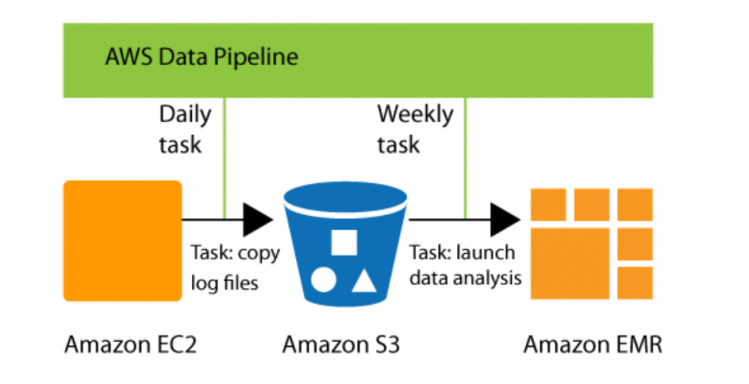
AWS Data Pipe Line Sample Workflow
Default IAM Roles
AWS Data Pipeline requires IAM roles to determine what actions your pipelines can perform and who can access your pipeline’s resources.
The AWS Data Pipeline console creates the following roles for you:
DataPipelineDefaultRole
DataPipelineDefaultResourceRole
DataPipelineDefaultRole:
                {
                "Version": "2012-10-17",
                "Statement": [
                 {
                 "Effect": "Allow",
                 "Action": [
                 "s3:List*",
                 "s3:Put*",
                 "s3:Get*",
                 "s3:DeleteObject",
                 "dynamodb:DescribeTable",
                 "dynamodb:Scan",
                 "dynamodb:Query",
                 "dynamodb:GetItem",
                 "dynamodb:BatchGetItem",
                 "dynamodb:UpdateTable",
                 "ec2:DescribeInstances",
                 "ec2:DescribeSecurityGroups",
                 "ec2:RunInstances",
                 "ec2:CreateTags",
                 "ec2:StartInstances",
                 "ec2:StopInstances",
                 "ec2:TerminateInstances",
                 "elasticmapreduce:*",
                 "rds:DescribeDBInstances",
                 "rds:DescribeDBSecurityGroups",
                 "redshift:DescribeClusters",
                 "redshift:DescribeClusterSecurityGroups",
                "sns:GetTopicAttributes",
                 "sns:ListTopics",
                 "sns:Publish",
                 "sns:Subscribe",
                 "sns:Unsubscribe",
                 "iam:PassRole",
                 "iam:ListRolePolicies",
                 "iam:GetRole",
                 "iam:GetRolePolicy",
                 "iam:ListInstanceProfiles",
                 "cloudwatch:*",
                 "datapipeline:DescribeObjects",
                 "datapipeline:EvaluateExpression"
                 ],
                 "Resource": [
                 "*"
                 ]
                 }
                ]
                }
DataPipelineDefaultResourceRole:
                {
                "Version": "2012-10-17",
                "Statement": [
                {
                 "Effect": "Allow",
                 "Action": [
                 "s3:List*",
                 "s3:Put*",
                 "s3:Get*",
                 "s3:DeleteObject",
                 "dynamodb:DescribeTable",
                 "dynamodb:Scan",
                 "dynamodb:Query",
                 "dynamodb:GetItem",
                 "dynamodb:BatchGetItem",
                 "dynamodb:UpdateTable",
                 "rds:DescribeDBInstances",
                 "rds:DescribeDBSecurityGroups",
                 "redshift:DescribeClusters",
                 "redshift:DescribeClusterSecurityGroups",
                 "cloudwatch:PutMetricData",
                 "datapipeline:*"
                 ],
                 "Resource": [
                 "*"
                 ]
                }
                ]
                }
Error Message:
Error MessageUnable to create resource for @EC2ResourceObj_2017-05-05T04:25:32 due to: No default VPC for this user (Service: AmazonEC2; Status Code: 400; Error Code: VPCIdNotSpecified; Request ID: bd2f3abb-d1c9-4c60-977f-6a83426a947d)
Resolution:
When you look at your VPC, you would notice Default VPC is not configured. While launching EC2 Instance on Data Pipeline, by default it can’t figure out which VPC to use and that needs to be explicitly specified in Configurations.
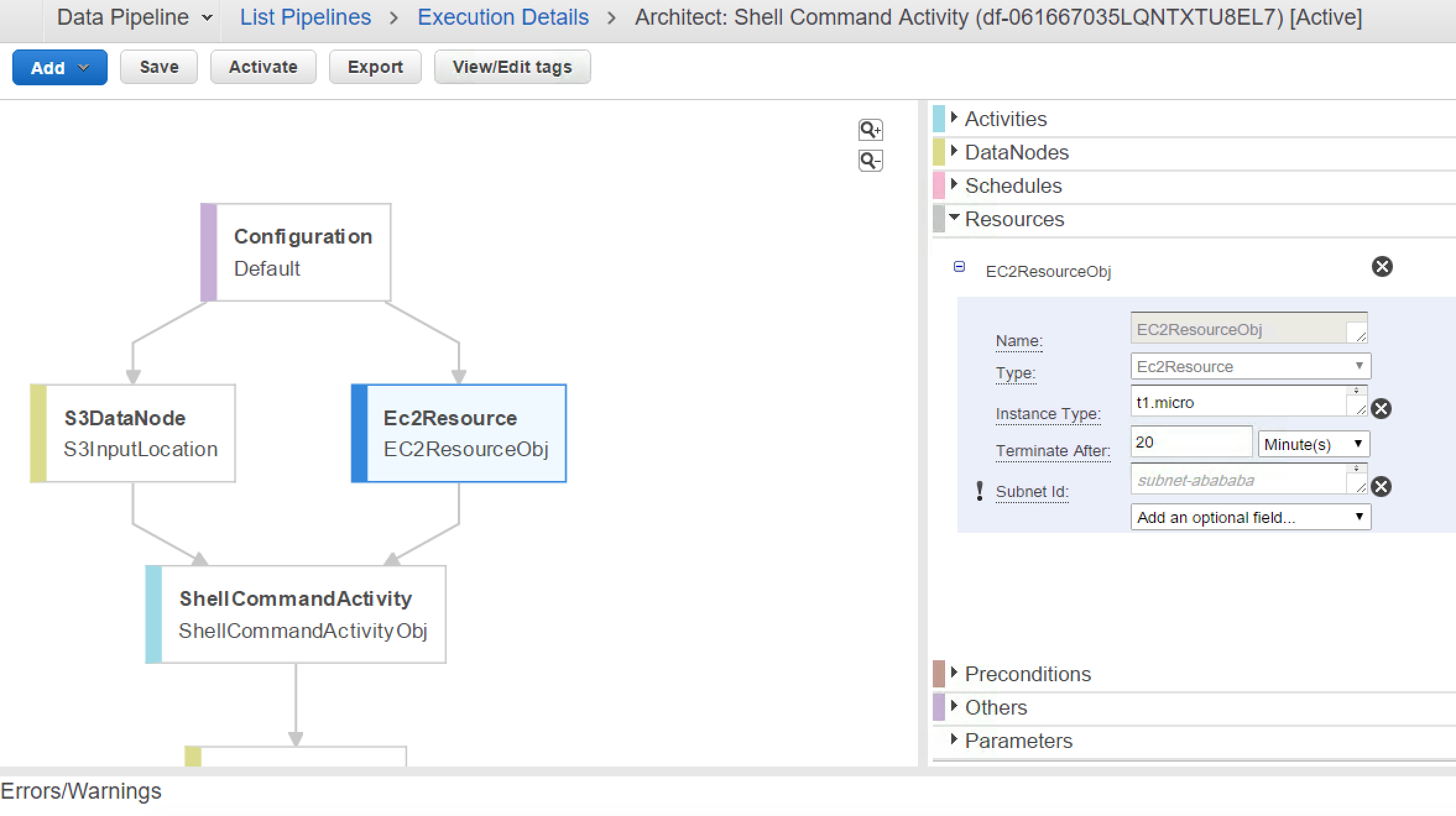
SubNetID for EC2 Resource

Default VaPC
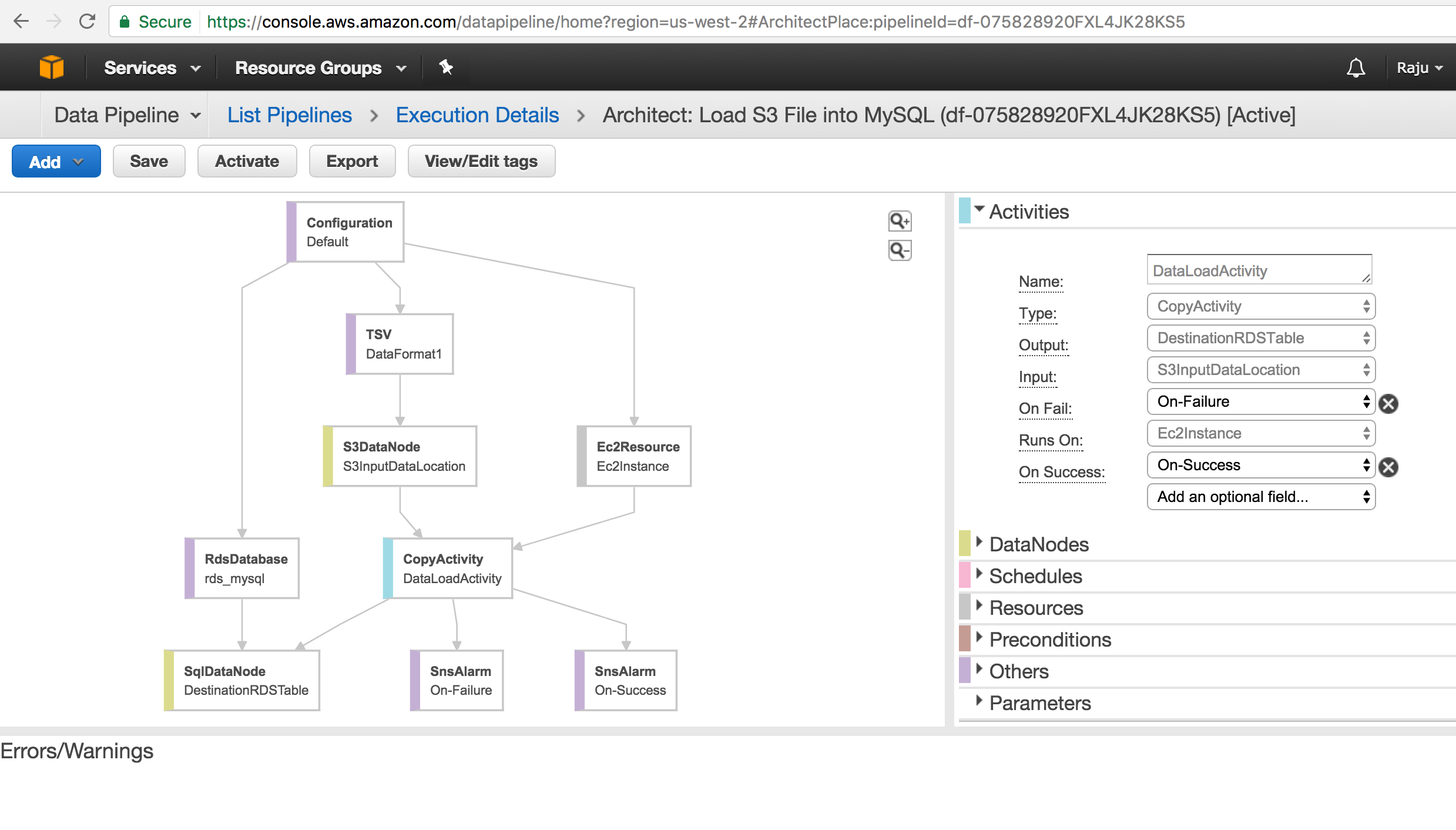
Build Sample Data Pipeline to Load S3 File into MySQL Table :
Use Cases for AWS Data Pipeline
Setup sample Pipeline in our develop environment
Import Text file from AWS S3 Bucket to AURORA Instance
Send out notifications through SNS to [email protected]
Export / Import Data Pipe Line Definition.
Prerequisites:
Have MySQL Instance
Access to Invoke Data Pipeline with appropriate permissions
Target Database and Target Table
SNS Notification setup with right configuration
Steps to Follow:
Create Data Pipeline with Name
Create MySQL Schema and Table
Configure Your EC2 Resource ( Make sure EC2 instance has access to MySQL Instance ).
If MySQL instance allows only certain IPS’s and VPC, then you need to configure your EC2 Resource in the same VPC or Subnet.
Configure Data Source and appropriate Data Format ( Notice this is Pipe Delimited File ant CSV File ).
Configure your SQL Insert Statement
Configure SNS Notification for PASS / FAIL Activity.
Run your Pipeline and Troubleshoot if errors occur.
Data Pipe Line JSON Definiton:
AWS_Data_PipeLine_S3_MySQL_Defintion.json
Create Table SQL :
                create table users_01(
                userid integer not null primary key,
                username char(8),
                firstname varchar(30),
                lastname varchar(30),
                city varchar(30),
                state char(2),
                email varchar(100),
                phone char(14),
                likesports varchar(100),
                liketheatre varchar(100),
                likeconcerts varchar(100),
                likejazz varchar(100),
                likeclassical varchar(100),
                likeopera varchar(100),
                likerock varchar(100),
                likevegas varchar(100),
                likebroadway varchar(100),
                likemusicals varchar(100))
                INSERT INTO `ETLStage`.`users_01`
                (`userid`,
                `username`,
                `firstname`,
                `lastname`,
                `city`,
                `state`,
                `email`,
                `phone`,
                `likesports`,
                `liketheatre`,
                `likeconcerts`,
                `likejazz`,
                `likeclassical`,
                `likeopera`,
                `likerock`,
                `likevegas`,
                `likebroadway`,
                `likemusicals`)
                VALUES
                (
                ?,
                ?,
                ?,
                ?,
                ?,
                ?,
                ?,
                ?,
                ?,
                ?,
                ?,
                ?,
                ?,
                ?,
                ?,
                ?,
                ?,
                ?
                );
Errors Encountered:
errorMessage Quote character must be defined in record format
https://stackoverflow.com/questions/26111111/data-pipeline-error-on-a-template-from-rds-to-s3-copy
You can use “TSV” type as your custom format type and provide:
- “Column separator” as pipe(|),
- “Record separator” as new line(\n),
- “Escape Char” as backslash(\) or any other character you wa
errorId : ActivityFailed:SQLException
errorMessage : No value specified for parameter
errorMessage : Parameter index out of range (1 > number of parameters, which is 0).
errorMessage : Incorrect integer value: ‘FALSE’ for column ‘likesports’ at row 1
Ensure the Table Column Data Type set to correct . By Default MySQL Doesn’t covert TRUE / FALSE into Boolean Data Type.
errorMessage : Parameter index out of range (1 > number of parameters, which is 0).
errorMessage for Load script: ERROR 1227 (42000) at line 1: Access denied; you need (at least one of) the LOAD FROM S3 privilege(s) for this operation
Share this:

CloudIQ is a leading Cloud Consulting and Solutions firm that helps businesses solve today’s problems and plan the enterprise of tomorrow by integrating intelligent cloud solutions. We help you leverage the technologies that make your people more productive, your infrastructure more intelligent, and your business more profitable.
LATEST THINKING
INDIA
Chennai One IT SEZ,
Module No:5-C, Phase ll, 2nd Floor, North Block, Pallavaram-Thoraipakkam 200 ft road, Thoraipakkam, Chennai – 600097
© 2023 CloudIQ Technologies. All rights reserved.